XpenseApp lite1.15
Publisher Description
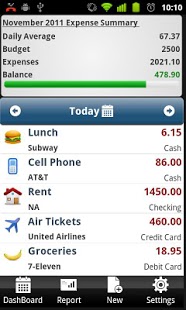
XpenseApp - Take control of your finance Today!
XpenseApp simplifies daily expense tracking and budgeting.
Now you can record expenses anywhere, anytime within seconds.
Customize your personal and business expenses with easy to understand reports.
Take control of your finance today with XpenseApp!
Key features:
✔ Highly customizable and practical.
✔ Dashboard displays Yearly,Monthly & weekly expense report.
✔ Set Budgets - Provides simple and advanced budgets.
✔ Track both income and eXpenses.
✔ Customize icons for categories and subcategories.
✔ Overview of Today's spending vs daily spending average.
✔ Expense Summary of total, average expense per day and top expense of the month
✔ Instantly generate graphical reports.
Keywords: [money tracker, budget tracker, expense tracker, budget manager, expense manager, savings, save money, log, spending, payment, cash, exchange, personal finance, wallet, checkbook, checking account, currency, euro, dollar dollars, pound pounds, bank, mobile banking, easymoney, receipt, gastos,, pageonce, s-banking, checkbook, cashbook, ledger, budget envelope, expenseapp,expense app,xpense app,]
About XpenseApp lite
The company that develops XpenseApp lite is Dmitri.. The latest version released by its developer is 1.15. This app was rated by 1 users of our site and has an average rating of 5.0.
To install XpenseApp lite on your Android device, just click the green Continue To App button above to start the installation process. The app is listed on our website since 2012-01-02 and was downloaded 124 times. We have already checked if the download link is safe, however for your own protection we recommend that you scan the downloaded app with your antivirus. Your antivirus may detect the XpenseApp lite as malware as malware if the download link to com.app.expense.tracker.xpenseapp.lite is broken.
How to install XpenseApp lite on your Android device:
- Click on the Continue To App button on our website. This will redirect you to Google Play.
- Once the XpenseApp lite is shown in the Google Play listing of your Android device, you can start its download and installation. Tap on the Install button located below the search bar and to the right of the app icon.
- A pop-up window with the permissions required by XpenseApp lite will be shown. Click on Accept to continue the process.
- XpenseApp lite will be downloaded onto your device, displaying a progress. Once the download completes, the installation will start and you'll get a notification after the installation is finished.
Program Details
System requirements
Download information
Pricing
Version History
version 1.15
posted on 2012-01-02
Option added to Backup/restore data.
